
Why I Needed a Home Printer for My Son’s School Work?
I love printing fun learning sheets at home — something that has really supported our mindful parenting journey
As moms, we all know this situation too well — suddenly the school WhatsApp group explodes with worksheets, craft printables, photos to submit, and last-minute projects! 😅 I recently decided it’s finally time to bring a printer home so I don’t have to keep running to the Xerox shop for every tiny thing.
So after a good amount of scrolling, Googling, reading reviews, and watching videos during nap time (you know the drill 🤭), I shortlisted two printers that are very popular for home use:
✅ The Final Two
The Two Best Budget Home Printers I Shortlisted
1️⃣ Canon PIXMA E470
2️⃣ HP Ink Advantage 4278
And since I’m a mom — my priorities are simple:
✔ Budget-friendly
✔ Easy to use
✔ Prints school worksheets nicely
✔ Ink should not become a monthly expense 😅
✔ WiFi printing (so I can print directly from my phone while juggling a toddler!)
Let me share what I found:
🖨️ Canon PIXMA E470 – Best for Simple Home Printing
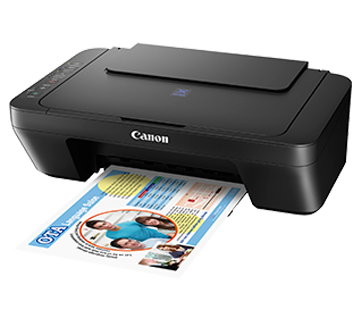
Compact & Affordable for Light School Printing
This one is super compact — perfect if you don’t want a bulky box taking up space in your house. It’s ideal for light to moderate home printing like:
- Worksheets and school projects
- Recipes and planners
- Colour printouts occasionally
It also supports WiFi printing and scans well. It’s said to be economical for daily usage since the ink cartridges give a decent number of prints.
Best for moms who: print a few pages daily or weekly and want something budget-friendly.
You can check the full Canon E470 specs here.
🖨️ HP Ink Advantage 4278 – Better for Multi-Page Scanning & Busy Moms
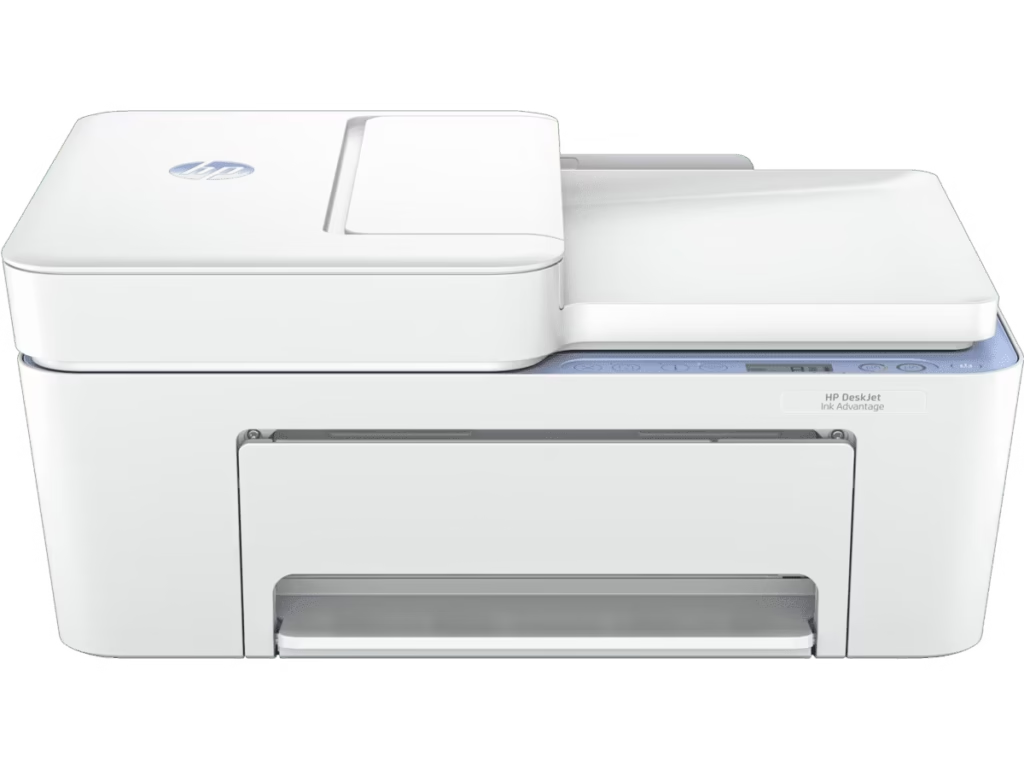
Great for Multi-Page Scanning and Busy Moms
This one is a little bigger and slightly costlier but it comes with something magical for moms:
✨ ADF – Automatic Document Feeder
Which simply means you can put multiple pages at once for scanning or copying — no need to manually lift the lid every single time. 😍 Huge time-saver during school admission paperwork or when scanning multi-page homework!
Print quality is good, colours look brighter, and it feels suitable for a home-plus-small-office setup.
Best for moms who: need to scan/print more frequently and want convenience.
You can check the full HP Ink Advantage 4278 specs here.
Mom-to-Mom Verdict 👩👦💬
| Feature | Canon PIXMA E470 | HP Ink Advantage 4278 |
| Price | More budget-friendly | Slightly higher |
| Best For | Light school printing, home use | Busy moms, frequent scanning/printing |
| Printing Needs | Occasional worksheets, small projects | Daily school printables, admission forms, note |
| Wi-Fi Printing | Yes, very convenient | Yes, smooth connectivity |
| ADF (Automatic Document Feeder) | ❌ No — single-page scanning | ✔️ Yes — scan multiple pages at once |
| Size & Space | Compact & lightweight — fits anywhere | Bigger & heavier — needs more space |
| Ink Consumption / Cost | Economical ink replacement | Ink also good but refills cost a bit more |
| Print Speed | Good for light usage | Faster & more efficient |
| Print Quality | Clear for text + decent colour prints | Better colour sharpness overall |
| Who Will Love It? | Moms with younger kids (Nursery–UKG) | Moms with school-going kids with more assignments |
If your printing needs are simple — Canon E470 is the perfect budget printer for home.
But if your child’s school sends tons of printables (every day!), and you see yourself scanning more pages often — HP 4278 will make life easier.
What I Finally Chose
Which Printer Should You Buy? My Mom Verdict
After lots of thought about space, usage, and budget — I’m leaning towards Canon PIXMA E470 for now, since my son is still little and prints are not too many. 😄
But who knows… once school fully starts, HP’s ADF might come calling again! 🤣
If you’re also a mom looking for a good home printer, I hope this helped you decide. 💛
Let me know in the comments which printer you use at home any mom hacks are always welcome on Mumoo Talks! ✨📚🖨️